Ranking
Site speed, Google Maps and SEO, checked every day from the client area
Most site owners look at their speed once, at launch, and at their map listing never. This module looks every day. It asks PageSpeed Insights, looks the business up on Google Maps for each keyword in its town, runs the SEO check over every page, and turns the lot into five scores — with the exact step behind every cross. It also checks accessibility, and sums each month up on a single sheet.

Measured
- PageSpeed on a phone and a desktop, in Google's four categories
- The slowest three audits, in Google's own words
- Whether the business shows on Google Maps under its name, with stars and reviews
- The position of every keyword in Google search from Search Console, with clicks and impressions
- Map rank for up to ten search terms, each paired with your town
- Accessibility: colour contrast against the 4.5:1 of WCAG, alt text, headings, link text, form labels and button names
Shown
- Five scores out of 100 — search basics, how well AI can read the site, the technical side, content and local presence
- Colour-coded: 80 and up green, 50 to 79 yellow, under 50 red
- Every finding with a tick or a cross
- What holds the site back, in the order to tackle it
- Add an AI key and get five written tips on top
- A monthly report on one sheet — print it, save it as PDF or have it mailed
Run
- Once a day, when somebody opens the client area
- No cron, no scheduler
- A manual run any time, with a bar that fills as it goes
- A history per day; clear it to start again
- Your Google key, your quota, your bill at Google
Speed, the way Google sees it
Google's own number, and the reasons behind it.
Each check runs PageSpeed Insights on the home page, once as a phone and once as a desktop. Beside the four scores sit the three slowest audits, worded the way Google words them — usually an oversized image, a font that blocks rendering or a script that waits.


Found on the map
Does the business show up when someone nearby searches?
The check starts with the listing itself — name, stars, number of reviews — and then looks up each keyword plus town to see where the business lands on the map. No listing found? The screen lists what to compare, and more often than not it is the name: site and Business Profile have to spell it the same way. Connected with Google — "Connect with Google" under Settings — the check adds the position of every keyword from Search Console: the average of the last four weeks, with clicks, impressions and the searches that found the site.
What to fix first
Every cross comes with the step that clears it.
Under the scores comes a short list of what holds the site back, ordered by what to do first: a slow phone score, pages with no description, a map listing under a different name. Each entry explains why it counts and what fixes it. An AI key adds five written tips, and a week on, the history tells you whether the change paid off.

Accessibility
Can everyone use the site — including people who cannot see it well?
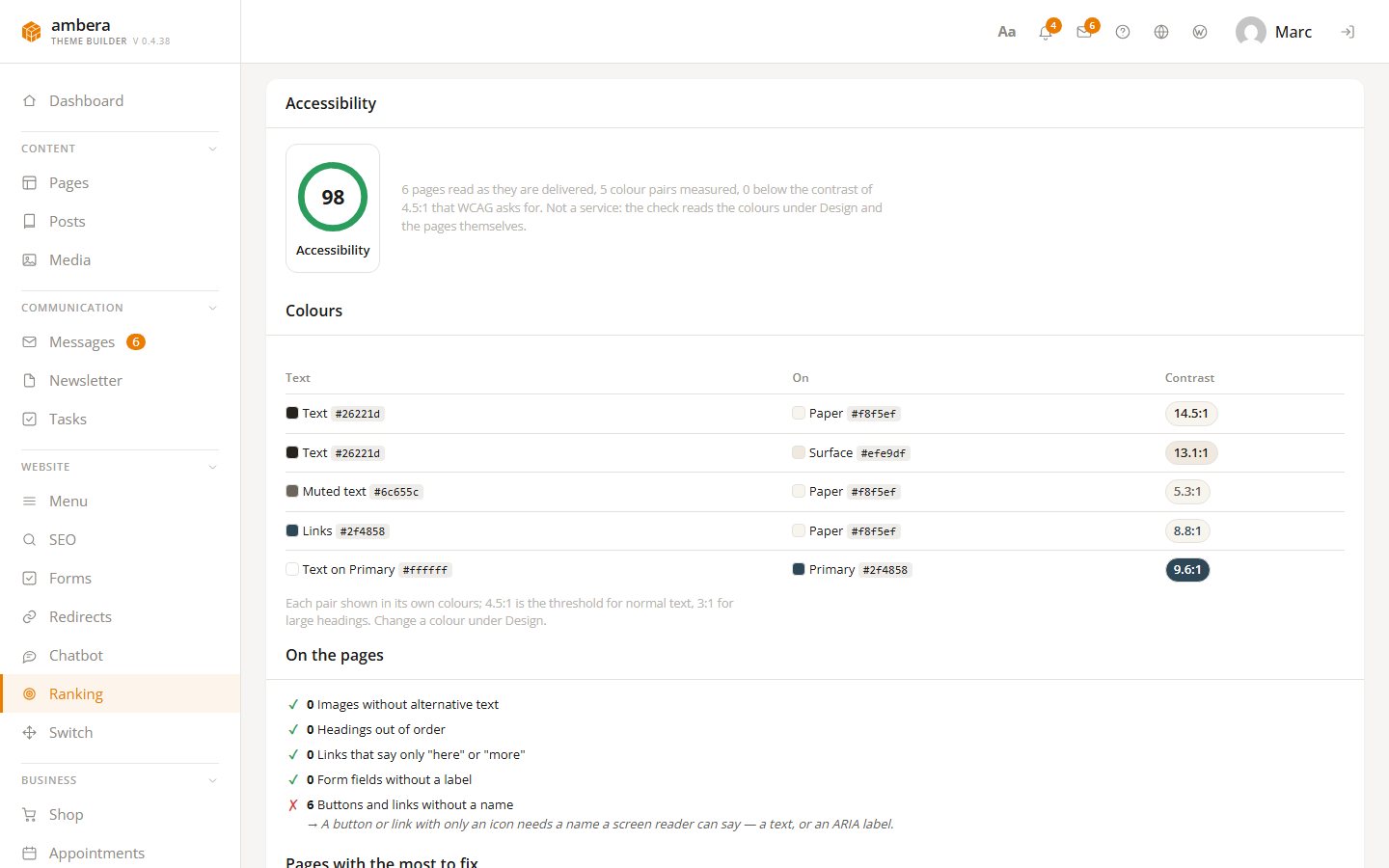
The Accessibility card is no outside service: it reads the colours under Design and up to fifty pages exactly as they are delivered. Every pairing of text and background — text on paper, muted text, links, text on the primary colour — is shown with its contrast; WCAG asks for 4.5:1 on normal text, and anything below is flagged. On the pages it counts images with no alternative text, headings out of order, links that only say "here" or "more", fields with no label and buttons with no name, worst pages first, each with its fix.
Monthly report
One month, one sheet — for you or for a client.
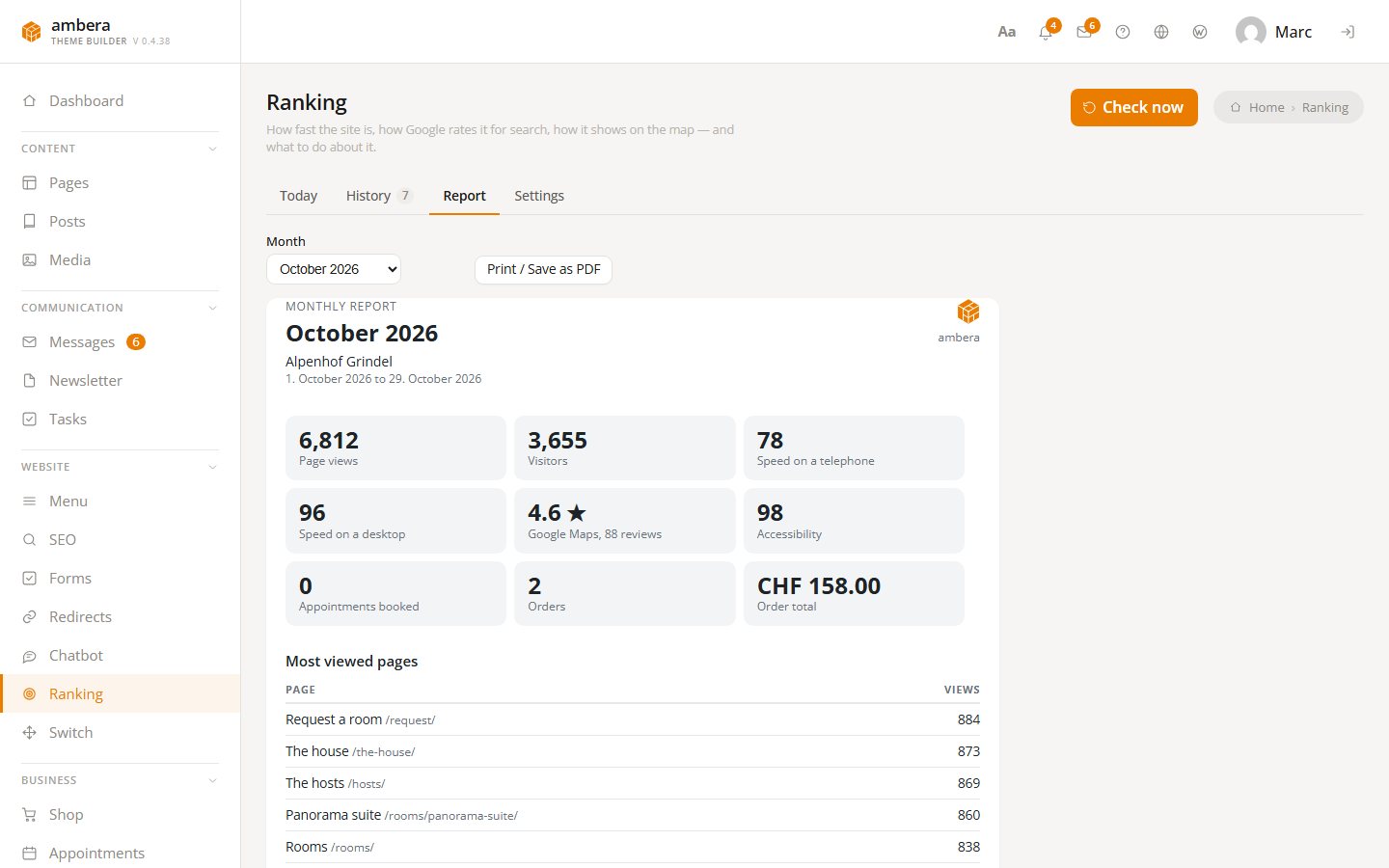
The Report tab puts a month on a single sheet: page views and visitors with the top pages, the average position with the best keywords, speed on phone and desktop, the map, accessibility, new and won leads per source, bookings and orders — only what the site actually measures. Print / Save as PDF turns it into something to hand a client, and Monthly report by mail sends it on its own on the first visit to the site in a new month.
Questions
What has to be set up?
A Google API key — the translation key will do — with PageSpeed Insights and Places API (New) switched on. Then tell the module the business name, its town and up to ten search terms. For the positions, a verified property in Search Console and "Connect with Google".
Does it track positions in Google search?
Yes, through Google Search Console. "Connect with Google" under Settings signs you in at Google — through the portal, which keeps the credentials — and picks the property of the site. From then on every keyword shows the average position Google measured over the last four weeks, with clicks, impressions and the searches that found the site. The Custom Search JSON API, which Google switches off on 1 January 2027, is no longer needed.
Does it change anything on the site?
No. It measures and tells you what to do. No block, nothing on the front end.
Does the accessibility check replace an expert audit?
No. It finds what can be read from the colours and the code of the pages — contrast, missing alt text, headings, labels, button names. Whether an alt text describes its image well, or whether the site works with a keyboard, it cannot tell.
Who gets the monthly report?
The address you enter under Settings, otherwise the administration email of the site. With Monthly report by mail switched on, the sheet for the month before goes out on the first visit to the site in a new month, no scheduler involved; Send now sends the last month straight away.
What does it cost?
We charge nothing for it. Requests go through your own Google account and count against its quota.
Is this in the free version?
No, Ranking needs Pro.

The WordPress theme builder has a name.

Built in Switzerland. Built for WordPress.